
Proforma Entries
Proforma Entries Configuration
Welcome to AccuBooks Configurations of Proforma Entries. Proforma Entries module is designed to streamline and customize the accounting process, ensuring that journal entries are automatically and accurately generated based on the specific needs of the business.
This guide will walk you through the following:
1. Understanding Proforma Entries: It explains what proforma entries are and their role as templates for journal entries within the accounting system.
2. Reviewing and Updating Entries: It guides users on how to review the default proforma entries provided by the system to ensure they align with the specific chart of accounts used by their business.
3. Customizing Journal Entries: The guide instructs users on how to customize these entries, such as changing the names and details of accounts to match the business's specific needs (e.g., specifying a particular bank for cash receipts).
4. Navigating the System: It provides step-by-step instructions on how to navigate the proforma entries module, including how to access, edit, and update entries within the system.
5. Ensuring Accuracy: The guide helps ensure that all journal entries generated by the system are accurate and appropriate for the business's financial records by showing how to correctly set up and modify proforma entries.
What are Proforma Entries?
Proforma entries in accounting are hypothetical or projected transactions and adjustments made in financial statements to show the potential impact of future events or changes that are not yet realized. These entries are used for planning, decision-making, and communicating financial scenarios
Key Purposes
Importance of Proforma Entries
1. Template Provision: Proforma entries provide predefined templates for journal entries, ensuring that common transactions like cash receipts, sales, collections, purchases, payments, and disbursements are consistently recorded in the accounting system.
2. Customization: They allow businesses to tailor these templates to their specific chart of accounts. This customization ensures that the entries accurately reflect the business's unique financial structure and needs.
3. Automation: By using proforma entries, the accounting system can automatically generate journal entries for various transactions. This automation saves time and reduces the likelihood of manual errors.
4. Adaptability: The ability to update and change proforma entries means that the system can be adapted to different banks or specific accounts as required by the business. This flexibility ensures that all transactions are correctly categorized and accounted for.
5. Consistency: Ensuring that all journal entries follow a standardized format helps maintain consistency across the business's financial records, which is crucial for accurate reporting and analysis.
Proforma Entry Types
These proforma entry types are pre-configured in the system to automate and streamline the recording of these common business transactions.
1. Cash Receipts: These are entries related to the inflow of cash into the business, such as payments received from customers.
2. Sales: These entries capture revenue from the sale of goods or services.
3. Collections: These are entries related to the collection of receivables, such as payments from customers on credit.
4. Purchases: Entries that record the acquisition of goods or services for the business.
5. Payments: These entries cover cash outflows for various expenses or liabilities.
6. Cash Disbursements: These are entries related to the payment of cash for expenses, purchases, or other financial obligations.
How to Edit an Existing Proforma Entry Setup
Follow these steps to modify a pre-existing proforma entry in the system:
- Navigate to Configurations: On the main left-hand sidebar menu, scroll down to the SETUP section and click on CONFIGURATIONS.
- Access Proforma Entries: Under the Ledger Setup sub-category, click on Proforma Entries to view your list of templates.
- Select the Entry to Edit: Click on the specific entry you want to modify (for example, Cash in Bank) from your list to open its READ detail view.
- Enter Edit Mode: Once you are on the "PROFORMA ENTRIES - READ" details page, locate and click the Edit button (represented by a blue icon) located below the entry fields.
- Modify the Fields: Update the necessary fields as required by your accounting standards:
- Name: Change the descriptive title of the entry if needed.
- T Account: Adjust whether this specific template leg defaults to a Debit or a Credit.
- Chart of Account: Click the dropdown menu to reassign the entry to a different account code (e.g., swapping
100-1100: Cash On Handto100-1200: Cash in Bank - BDO, or any other appropriate account from your active Chart of Accounts list).
- Save Changes: Scroll down or look for the Save / Update button at the bottom of the form to commit your changes to the system.
Note: Any changes made to Proforma Entries will apply to future transaction processing that calls upon this template. It will not retroactively alter finalized vouchers or historical journals already posted in the system.
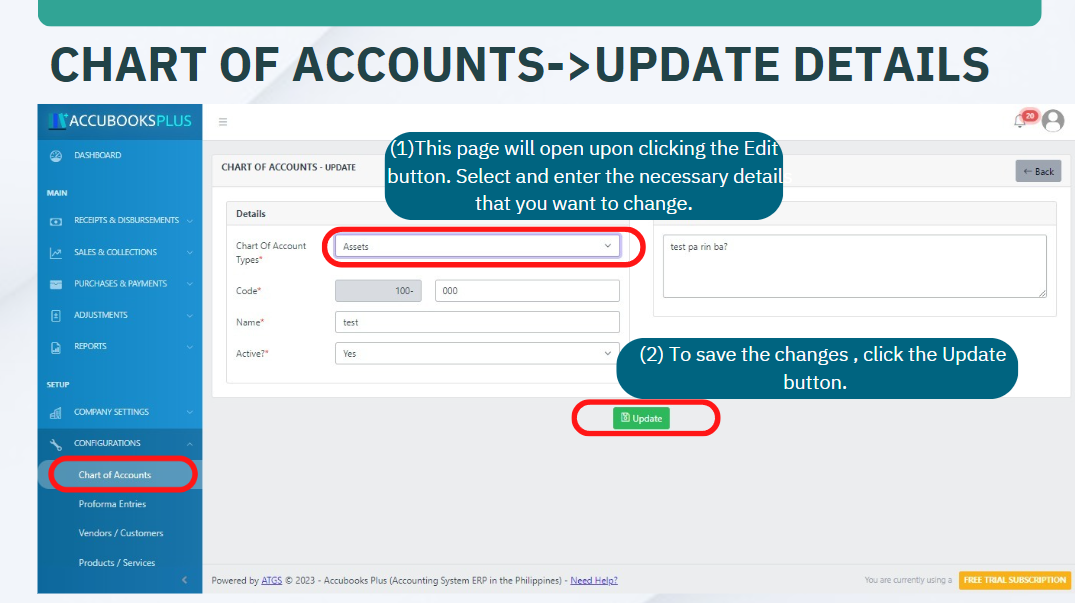
Chart of Accounts Lists is the list all the chart of account applicable to the company's operations with complete details.
Chart of Account Ledgers - Ledgers in the system are used for grouping and classifying the Chart of Accounts Lists into subgroups.
Note
Chart of Account Groups and Types are default values in AccuBooks Accounting System. There are also default values under Chart of Account Lists essential for proforma entries.