Transaction Cut Off Date
Transaction CutOff Date
Welcome to AccuBooks Configurations of Transaction Cut-Off Date. The purpose of setting a Transaction Cutoff Date in an accounting system is to establish a clear boundary for recording transactions within a specific accounting period. This cutoff date allows AccuBooks to ensure that all transactions are appropriately captured in the correct period, which is critical for accurate financial reporting and compliance. Here’s a detailed explanation of why it is important and what it entails:
Purpose
The Transaction Cutoff Date is a security and control feature in AccuBooks Plus designed to prevent data entry errors and protect the integrity of historical accounting records.
Setting a cutoff date establishes a hard boundary for data entry across all modules (Receipts & Disbursements, Sales & Collections, Purchases & Payments, etc.). Once a cutoff date is active, the system locks down any period prior to that date. Users cannot backdate, create, or modify transactions before this specified date, ensuring that finalized financial reports (such as closed months or tax-reported periods) remain accurate and unaltered.
How to Configure or Update the Transaction Cutoff Date
Follow these steps to set or modify the cutoff date in your system:
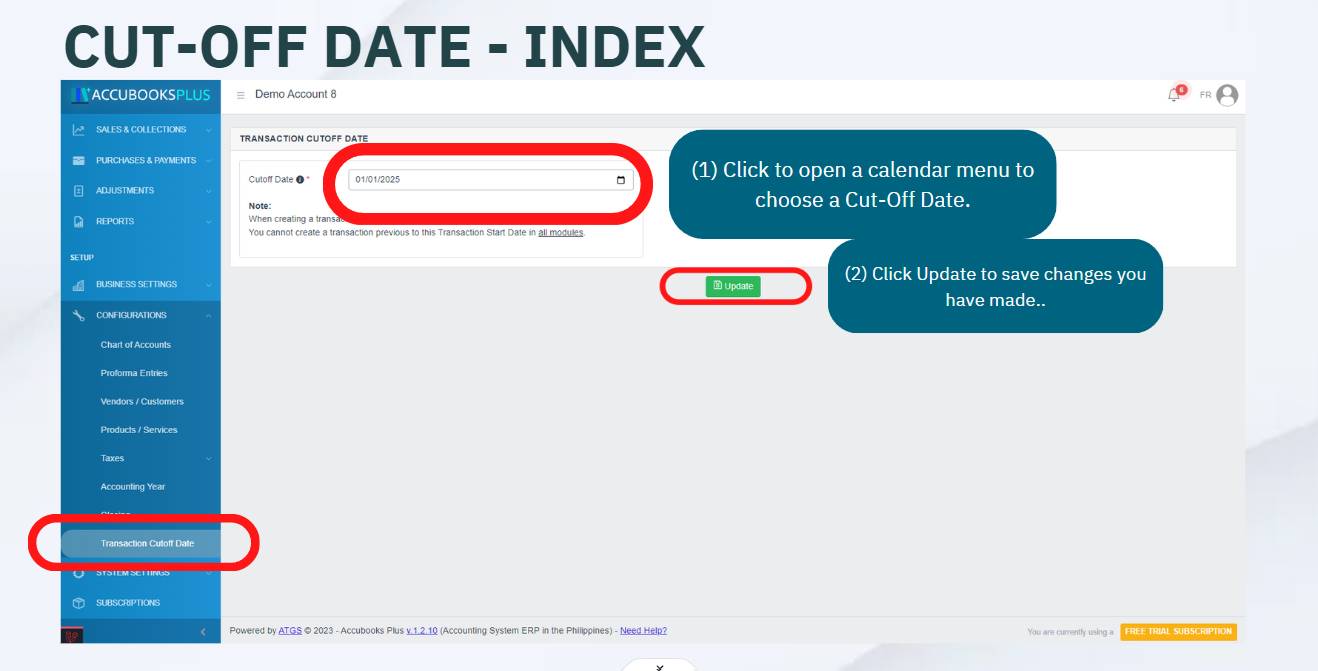
- Navigate to Date Control On the left-hand sidebar menu, scroll down to the SETUP section. Click on CONFIGURATIONS, expand the Date Control dropdown menu, and select Transaction Cutoff Date.
- Access the Cutoff Interface You will be directed to the Transaction Cutoff Date management page, where you will see the current active cutoff date and a warning note regarding its universal restriction across modules.
- Input the New Date Click inside the Cutoff Date field. You can either manually type the new date in the MM/DD/YYYY format or click the calendar icon on the right side of the input field to select your desired date from the calendar picker.
- Save Your Changes Review the selected date carefully to ensure it aligns with your closed accounting periods. Once verified, click the green Update button below the configuration card to save and apply the new cutoff rules across the entire platform.

Implications of the Example Note Fixed Start Date for Transactions:
The note specifies that any transaction entered into the accounting system cannot have a date prior to January 1, 2025. This means the system will not allow the entry of transactions dated before this cutoff date. Control Across All Modules:
This restriction applies to all modules within the accounting system, ensuring uniformity and consistency across different areas such as accounts payable, accounts receivable, inventory, and general ledger.
Benefits
(1). Data Integrity: Ensures that the data remains consistent and accurate across all accounting modules.
(2). Clear Financial Periods: Helps in maintaining clear distinctions between financial periods, aiding in better financial analysis and reporting.
(3). Audit Trail: Establishes a clear audit trail, as auditors can be confident that no transactions are backdated after the cutoff date.
(4). Operational Consistency: Provides operational consistency by enforcing a standardized process for entering transactions.
Transaction Cut-Off Date Module User-Manual
Below is a set of instructions to effectively set up, configure, and maintain AccuBooks' Transaction Cut-Off Date.
Note
System Specifications may vary based on your needs and requirements
Transaction Cut-Off Date Module Index User-Manual
(1). Click to open a calendar menu to choose a Cut-Off Date.
(2). Click Update to save changes you have made..